
Passkey Helper overview
Passkey Helper allows Microsoft Entra ID based organisations to move users from regular Entra ID MFA (push, SMS, etc) to requiring passkeys for their sign ins. It guides users to register, test and enforce their own account to require passkeys. Admins have a live view of progress, as their users move through the migration process.
What it does
- Checks existing authentication methods and device coverage.
- Guides users to register and test passkeys based on your preference.
- Do you want to recommend users to register hardware tokens, Microsoft Authenticator passkeys or synced passkeys (such as iCloud, Google, or 1Password)?
- The user self-enforces their account by completing the process in the migration helper. The helper will add the user to the enforcement groups linked to Conditional Access that the organisation controls.
- Provides an admin portal for progress tracking, chasing users and configuration.
How to use Passkey Helper
Initially, you need to create Entra ID groups and configure Conditional Access policies to enforce passkeys with these groups. Follow the sign-up process to provide initial Entra ID groups and configure the migration helper to guide users how you would like.
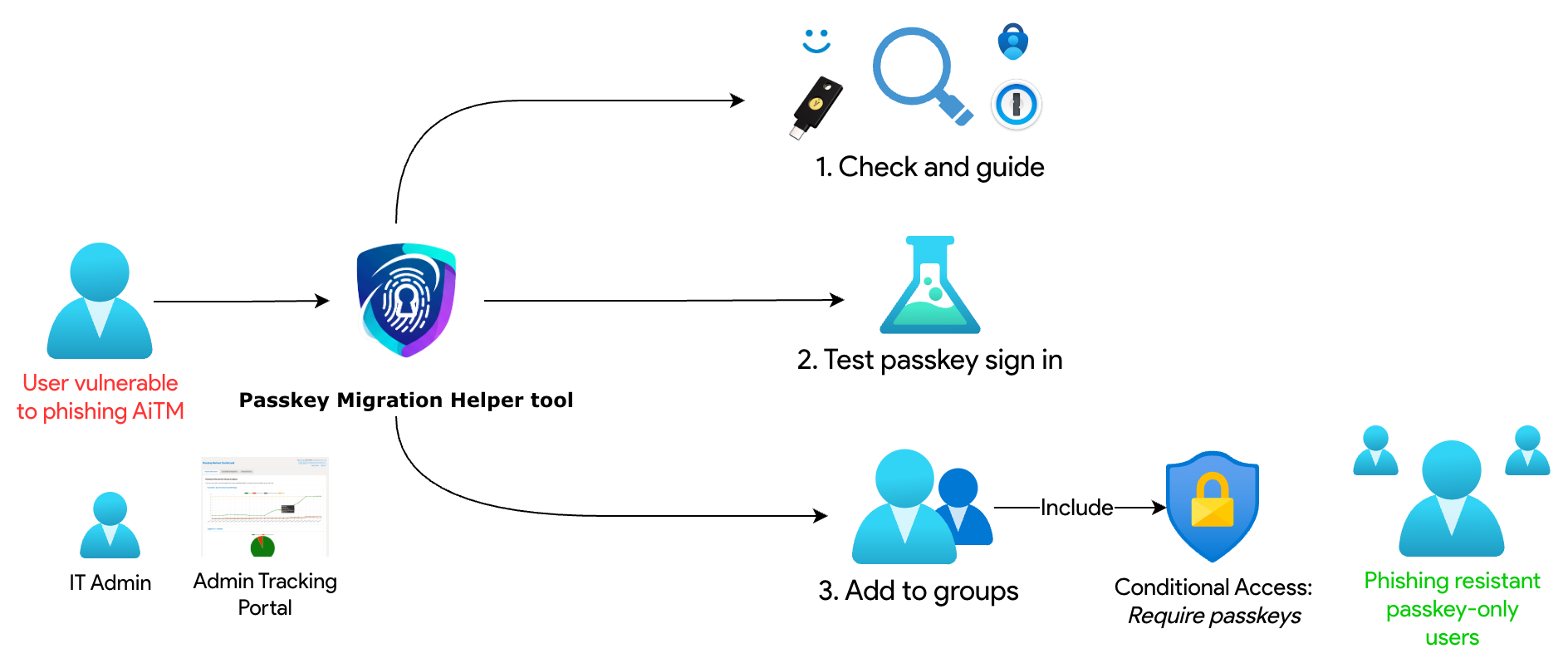
Core components
User-facing helper
Guides end users through readiness checks, passkey registration, and enforcement. Ask your users to visit app.passkeyhelper.com to start their migration.
Admin portal
Shows enforcement progress, ready-to-enforce users, and detailed sign-in insights.
Entra ID integration
Uses your Entra groups and Conditional Access policies to apply enforcement.
Where to go next
Use the quick start to configure group IDs and experience defaults once you have consent in place.