
Synced Passkeys Appearing in Entra? Was SMS the reason?
If you have SMS or voice authentication methods turned on, this is going to affect you!

Summary
From 1 September 2026, Microsoft is turning on passkeys for SMS or voice users. It turns out, this change bypasses any passkey profiles you may have configured to restrict passkey types. Surely that isn’t right? We don’t know if this is intended behaviour or not! See Microsoft’s SMS and voice retirement guidance. Read on to find out more, and how to ensure your passkey profiles are being followed.
What are the symptoms?
- A custom Passkey (FIDO2) profile is scoped to users and restricts the passkey types they can register.
- The User Registration Details report shows synced passkeys registered since 1 September for users enabled for SMS or voice across your tenant - bypassing your configured passkey profile.
- Authentication methods for these users shows the (unexpected) passkey as usable and does work for authentication.
- If the user goes to Security Info and tries to add a new method, the GUI offers ‘Passkey’ when it should only offer ‘Security Key’ or ‘Authenticator Passkey’ if your profile is locked down for only device-bound passkeys.
- Users in scope of this change have SMS or Voice enabled in Authentication Methods, and may or may not have a phone number registered! They’re allowed to add a number, and that’s enough for the identity to be in scope of the profile bypass.
- Affected users may already have a passkey through a locked down passkey profile, and even be required to use it via Conditional Access. This change would then allow that user to bypass the your configured passkey profile and allow registration and use of any type of passkey.
If you have not configured a FIDO2 passkey profile, then you should just read the Microsoft’s SMS and voice retirement guidance. The TLDR; This is going to require some time and effort. Microsoft are turning off SMS and Voice and replacing with passkeys (which is a great bold move). You’ve got to take steps now if you don’t want the default config of any passkey type being allowed. A passkey is better than no passkey, but you might want to control what’s going on.
What’s happening?
We think Microsoft is taking the following statements very literally:
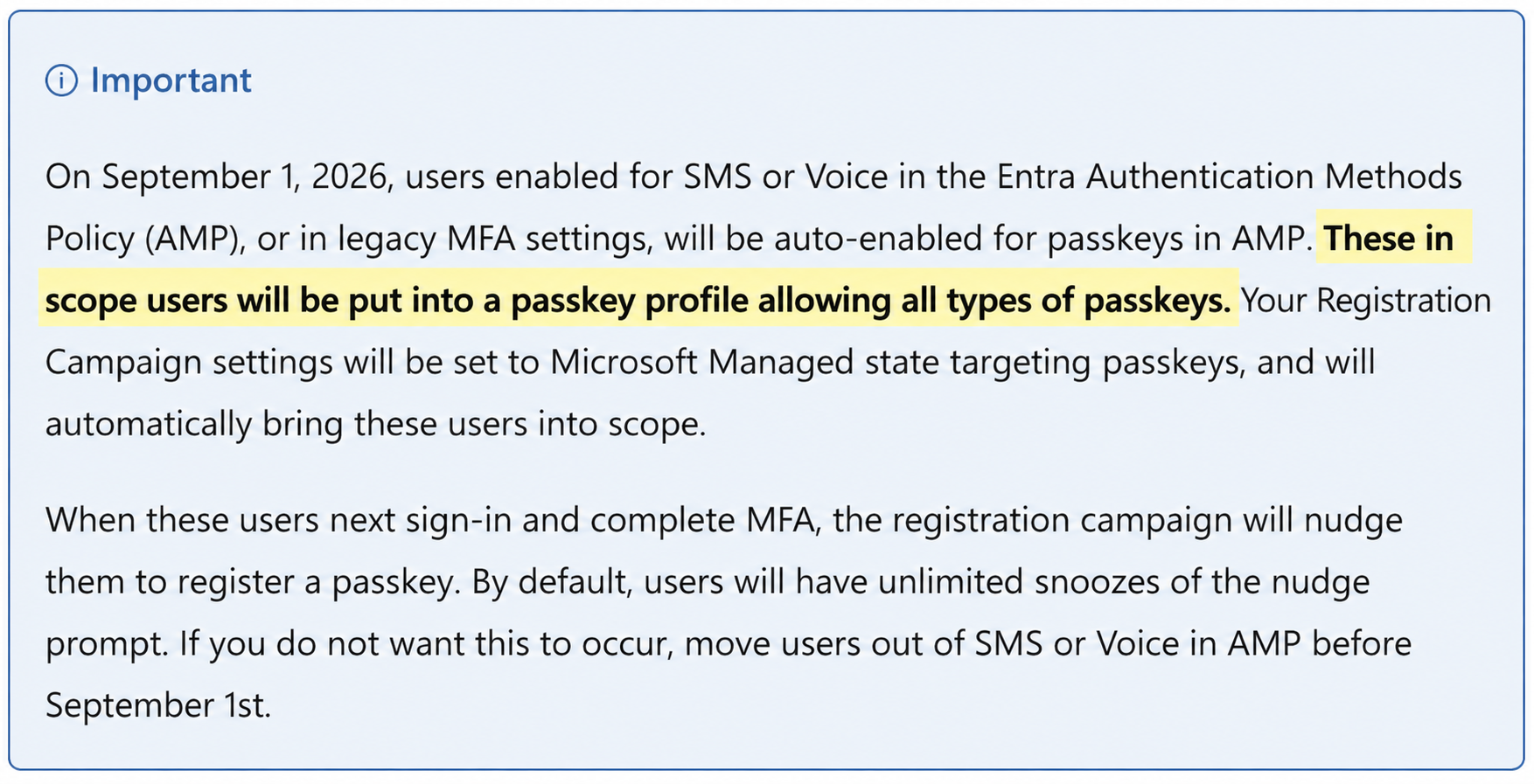
Passkey profiles apply cumulatively, so if you have one profile that restricts type and one that allows type - the user will get the union of those profiles.
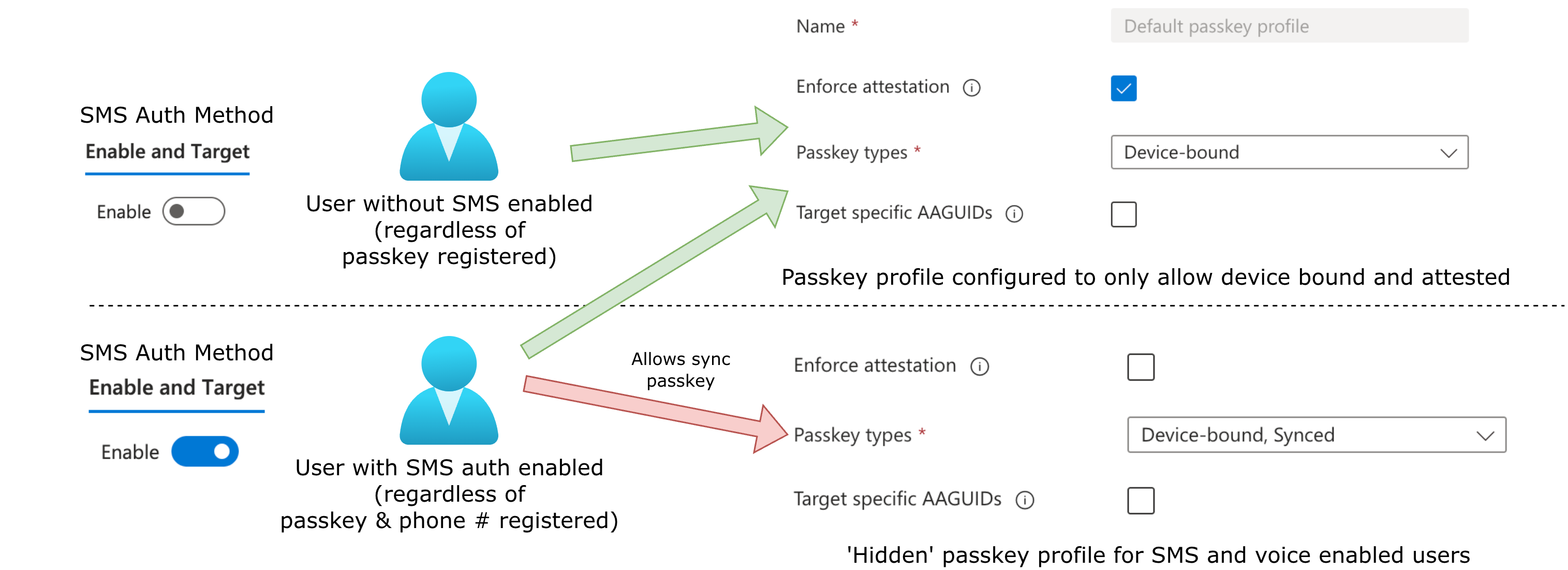
We don’t know exactly how Microsoft is applying the ‘profile’, it could be just code to ignore your passkey profile. Graph API calls does not show another passkey profile. The situation looks like below (logically, as there is no second profile in Graph API):
How about registration campaign?
Registration campaign is the feature that interrupts a user during sign in and asks them to register a passkey. The change mentions that users in scope will also have registration campaign turned on and set to passkey FIDO2 registration.
If your users have SMS enabled in Authentication Methods, and you have begun deploying passkeys through a limited passkey profile (e.g. device-bound only), then you may want to consider turning off registration campaign. This is because users are likely to actively get prompted to register a passkey, and that process will bypass the limited passkey profile you have configured.
If you have already disabled registration campaign, then users may realise they can register any passkey by chance - but you’ll get less incorrect registrations.
Once you turn off SMS and voice authentication, you’re safe to re-enable registration campaign.
What can you do?
Firstly, we are not sure if this behaviour will be changed by Microsoft at some point. As an administrator, you would expect that your passkey profile is always followed - which is not the case here.
In the meantime, if you want to immediately ensure that passkey profiles are being followed, we suggested one of the following controls:
1) Disable SMS and voice for your users
Go to Authentication methods
Disable SMS and disable voice. It may be possible to exclude certain users, but I’ve not tested this.
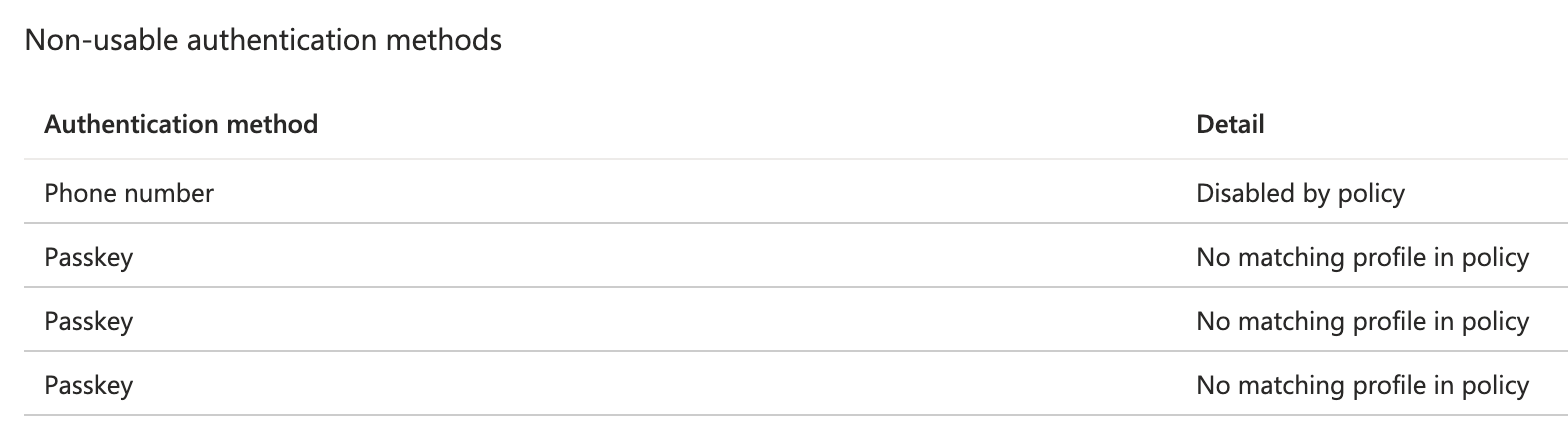
We did this to our tenant, and immediately got the authentication methods set to no longer usable:
Users who are currently using SMS or voice for MFA will likely be signed out and disrupted.
2) Delay Microsoft’s automatic passkey enablement
We have not been able to test that this works, but logic suggests it could work. To apply the temporary opt-out:
- Obtain the Microsoft Graph
Policy.ReadWrite.AuthenticationMethodpermission. - Send the following request to Microsoft Graph:
PATCH https://graph.microsoft.com/beta/policies/authenticationmethodspolicy
Content-Type: application/json

{
  "optOutSettings": {
    "passkeyDynamicMigration": true
  }
}
Despite the counterintuitive property name, Microsoft’s documented opt-out value is true. It excludes the tenant from automatic passkey and Registration Campaign enablement during the temporary opt-out period.
More details in Microsoft’s rollout guidance.
Remember Microsoft’s opt-out is temporary until 1st Feb 2027. If this behaviour is not changed by Microsoft, you will need to have disabled SMS and voice methods before then.
What are we seeing in the wild?
Our experience
We are supporting a company doing a phased passkey enforcement. Passkeys are being registered through the regular route. We enforce device-bound Authenticator passkeys with attestation.
The rollout consists of the user visiting our passkey helper tool and following the steps to register a passkey, followed by them pressing finish to self-enforce. The tool then enforces passkey authentication strength via a conditional access policy. From that point forward, the user is protected from phishing attacks.
On the 15th September 2026 we saw a rise in synced passkeys being registered. Authenticator started to ask to open the browser and we got AAGUIDs like:
| AAGUID | Friendly passkey provider name |
|---|---|
bada5566-a7aa-401f-bd96-45619a55120d |
1Password |
d3452668-01fd-4c12-926c-83a4204853aa |
Microsoft Password Manager |
d548826e-79b4-db40-a3d8-11116f7e8349 |
Bitwarden |
ea9b8d66-4d01-1d21-3ce4-b6b48cb575d4 |
Google Password Manager |
fbfc3007-154e-4ecc-8c0b-6e020557d7bd |
Apple Passwords / iCloud Keychain |
We turned off registration campaign - but analysing logs the campaign was not actually interrupting flow and causing the problem. The users were self-initiating, which makes sense as they were following steps to register a passkey.
From X
From LinkedIn
Need help?
We help several organisations plan and execute passkey rollout and enforcement, and can provide tailored support… even just being at the end of a Teams message. To explore consultancy options for rolling out passkey enforcement at scale, visit Passkey Helper.